Tuesday, 19 January 2010

Saturday, 12 December 2009

UltraSurf

Laman web UltraSurf.

Rajesh Rana..

So what exactly it is??

It is the flagship software product from UltraReach Internet Corp. for Internet anti-censorship. It enables users inside countries with heavy Internet censorship to visit any public web sites in the world safely and freely. it enables users to browse any website freely just the same as using the regular IE browser while it automatically searches the highest speed proxy servers in the background.

Learn More

What does it means??

  • 100% freedom to have 100% information in most secure way.
  • It means no matter where you are you can access 100% free version of internet I mean no firewalls no restriction nothing….
  • Almost all schools, universities and corporate offices raise firewalls to filter out not work related sites, now those firewalls will be of no use or they have to change their plans.
  • Everybody can access various social networks like Orkut, Youtube, Myspace, Hi5, Facebook, Linkedin etc. which are blocked almost in 99% schools and offices.
  • 100% real time and it’s encryption is better then any online banking system.

How to get going??

It’s very simple you have to just-

  • download an exe file
  • then extract it
  • and run
  • Set proxy if u have any (generally in offices internet are provided through proxies, you can find that, through tools, internet options, Connections,LAN Settings, there you are with proxy server for your LAN and it’s port
  • Just copy that to proxy settings of Ultrasurf.
  • Then a window will pop up, says some thing in Chinese, just close this window
  • And open fresh internet explorer
  • There you are, you can surf any information.
  • For office people: beware don’t spread words to your colleagues keep this info as limited as you can, coz if system people got to know about it then they’ll take your comp for scrutinizing.

What is the Flip Side??

I should start with a quote that I’ve learnt in my life

“Too much freedom can Make you or it can Break you”

The flip side is that you can access to anything, I thing you got my point, In school, universities and Work office various sites are blocked to raise their efficiency and productivity, and it is very much likely that if anyone get freedom he/she will definitely try to miss use it.

[Update:02.02.2008]

Some Useful tips:

I’ve heard one thing many times that Ultra Surf is slowing down net speed or Ultra Surf is not working or something like that but after so many experience of Q&A and personal experience i’ve found that it’s not the Ultra Surf but it’s the net connection that has problemo…..

  • Check your net connection remember that it needs certain level of net speed to run Ultra Surf smoothly.
  • check proxy settings of Ultra Surf, when u download fresh version u need to tweak proxy settings of Ultra Surf. do that manually, also sometimes proxy setting of Ultra Surf get vanished automatically.. do check for proxy setting and feed it manually. For any kind of browser Proxy IP address is 127.0.0.1 with port :9666 and For Ultra Surf it depends upon your network.
  • 8.8 is the latest one and it is the best coz when there is no net connectivity it automatically flashes a message…. it won’t hang u there for retry
  • also last tip is that when net slows down or ain’t working at all, just exit Ultra Surf and re start it. instead of retry.. try exit and re start it…trust me retry is bad idea. just restart the whole thing.

[Update:10.08.2007] If you are using browser other than IE, then you have to manually change your proxy IP address to 127.0.0.1 with port :9666 of Firefox browser.

[Update:02.02.2008] For Mac Users, change your proxy IP address to 127.0.0.1 with port :9666 of Safari browser.

[Update: 17.04.2008]

By stasik : “Solution for those u can not download it at office: after work go to internet cafe, download the soft and send it urself to ur mail. Next day at work open the mail save the soft and use it. There is no need to uninstall in case u dont need it. Just delete the u.exe file and thats all.
(How come u can not download it at work from site provided but will be able to download from ur email?????)

[Update: 21.04.2008]

Peter from Global Internet Freedom Inc. -

“While our tools (GPass/GTunnel/Freegate/Ultra Surf/FirePheonix) helped users in closed societies to access censored information on the Internet freely, the authorities in some places (like China) found a way to block us through anti-virus scanners. They just reported our software as virus or mal-ware. Some of these anti-virus companies are not responsible enough in their classification. It seems they just labeled our software as backdoor if enough people reported us that way.

In the past, we interacted with some of these anti-virus companies (including Symantec and Kaspersky), and upon close examination of our software, they reverted their signature database. But there are too many anti-virus companies for us to deal with now to clear all the record.

We are sorry for the inconvenience. But GPass/GTunnel/Freegate/Ultra Surf/FirePheonix are definitely not virus or backdoor. However, please download them from our official websites or reputable download sites such as download.com or Tucows.com, and check the digital signatures before running. In the past, in China, some evil guys added virus to our software and emailed it to many users. Please be alert and do not just run any file you download before verifying the signature or source.”

Download

For Downloading Latest Version please go through following links

Ultrasurf Download Links

  1. http://rajeshrana.net/db/
  2. http://rajeshrana.net/ultrasurf/

Update June 29, 2009: New Version Ultrasurf 9.5

Also Read


Tuesday, 10 November 2009

Teknik ambil gambar malam..


1) set ISO ke paling rendah ISO 100/200
2) set White balance ke Tungsten
3) set shutter speed ke paling slow
4) set appeture ke paling kecil F16/F18
5) set shutter timer ke 10 sec.
6) pakai nutrel Dinsity (ND)

Ebay Cost

Tali reket BG66 sharp.

1 pack harga malaysia (rm35) £6.21
Jual kat Ebay 1 pack = £8
Postage cost = £3
Total : £11.

Base on 3 pack..(£33)
Ebay inserting fee = £0.40
Final Value Fee (£0.99 ~ 49.99 = 9.9% base on Buy it now ) = £2.37 (£0.79/pack)
PayPal (£0 ~ 1,500 = 3.4% + £0.20) =£2.37 (£0.443/pack)
Postage = £0.42 (2nd class normal ) + £0.80 2nd class recorded.
Total cost : £4.92 -£33 = £28.08 / 3 pack = £9.36/pack - £6.21 = Untung £3.15 (RM17.80).

Cost untuk menjual diEbay adalah sekitar 10 ~ 14 % dari harga jualan.

Tips jualan : biarlah barangan ringan tetapi bernilai tinggi dari pada barangan berat tapi nilainya rendah sebab kerugian pada cost penghantaran..Ini kerana ebay dan Paypal hanya mengenakan peratus dari harga tetapi cost penghantaran tidak bergantung pada nilai barang tapi pada berat barang.


Friday, 30 October 2009

Kasut size

Kalau kasut sport:

Japan 25.5 ~ 26 cm
US 7.5 ~ 8
UK 7 ~ 7.5
Euro 40.5 ~ 41

Kalau kasut jalan

Japan 26 ~ 26.5 cm
US 8 ~ 8.5
UK 7.5 ~ 8
Euro 41 ~ 42SHOE SIZE CONVERSION CHART
The Japanese

International Shoe Size Conversion Charts/Converter Tables for Shoes Sizes

Filed under: travel — manoftoday @ 2:22 am

Adult Mens and Womens Shoe Size Conversion Table
M/W indicates Men’s or Women’s Sizes. Other systems are for either gender.
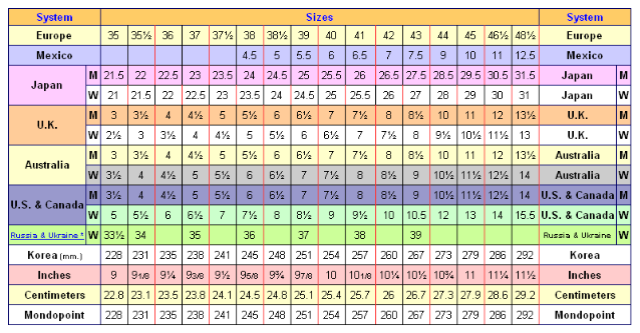
Source: International Shoe Size Conversion Charts/Converter Tables for Shoes Sizes


Thai Movie

Thai movie

List of Thai Movies
There are total 54 movie(s)

Thursday, 29 October 2009

Donggle

I managed to pick up the 3 (three) ZTE MF627 for just £9.99, it also came with a voucher for five free album downloads. This was using purchased from ‘3 Dongle 4 Free‘. I know they did these for free a few weeks a go, but I missed that offer.

I already had an unlimited Internet iPhone SIM card which I had spare from when I had my iPhone 3G. If you need to purchase one of these SIM card’s you can get one from eBay.

How to unlock your 3 ZTE MF627 USB Mobile broadband dongle:

Please only continue if you are using Windows XP! If you are on Vista, then this isn’t going to work.
Please only proceed if you know what you are doing!

1) Make sure that there is no sim card in the dongle.
2) Plug the dongle into the USB port on your PC/laptop, try to avoid using hubs as they could cause problems.
3) Install the drivers if you haven’t already done so, the installer should auto-run when the dongle is plugged in. If it doesn’t then start it manually from My Computer.
4) You should see the “Device is installed and ready to be used” message in your taskbar. Check in “Device Manager” to see if the device has been installed correctly.
5) Download ZTE.rar and unpack the file using WinRAR(or whatever you prefer to use).
6) Run Flash Updater, when it has found device the download button will become active. Click Download and leave it to flash, Mine took 18 minutes.
7) Do not unplug or use PC or you may break your dongle!
When it has finished it will tell you!
9) Unplug it & put in your Vodafone/T‐mobile/Orange or O2 Sim or whatever.
10) Run the auto run file and install Telstra connection manager, make sure there is no other connection manager installed, if there is then uninstall first. Depending on your type of sim you need to add the right config file for your provider.
11) Use one of the APN’s below;

For an o2 iPhone unlimited internet PAYG sim card the settings are:
Config Name = o2 iPhone PAYG
Dial Number= *99#
user = payandgo
pass= password
APN= payandgo.o2.co.uk
DNS servers= Automatic
SMTP gateway (for email): smtp.o2.co.uk

Other settings:
o2 Contract SIM:
Config Name = O2
Dial Number= *99#
user = faster
pass= password
APN= mobile.o2.co.uk
DNS servers= 193.113.200.195

3 SIM:
Internet
APN: three.co.uk
IP address: Leave blank
Username: Leave Blank
Password: Leave blank


or try the following;

APN: 3internet
dial number is *99#
password: leave blank
username leave blank

BT Mobile SIM:
Internet
APN: btmobile.bt.com
IP address: 212.183.137.12
Username: bt
Password: bt
URL: http://wap.btmw.net

o2 SIM:
APN: mobile.o2.co.uk
Username: mobileweb
Password: password
Primary DNS: 192.113.200.200
Secondary DNS: 192.113.200.201
SMTP gateway (for email): smtp.o2.co.uk

Orange SIM:
APN: orangeinternet
Username: Leave blank
Password: Leave blank
Primary DNS: 193.035.131.194
SMTP gateway (for email): smtp.orange.co.uk

T-Mobile SIM:
APN: general.t-mobile.uk
Username: user
Password: pass
Primary DNS: Set automatically
SMTP gateway (for email): smtp.t-email.co.uk

Vodafone SIM:
APN: internet
Username: web
Password: web
Primary DNS: 158.043.240.004
SMTP gateway (for email): smtp.vodafone.net